
How To Create A Professional Email Signature In Gmail
Not so long ago I shared some great tips on Why You Need A Professionally Branded Email Address. Today I want to show you how to create a professional email signature in Gmail as it’s so easy and can make your emails look a lot more professional and on brand.
I use Gmail as my email application for my business, it's such a great tool it has definitely made my life easier to manage.
Right, let’s get to the step by step instructions...

1 | Create a new document in Google Docs
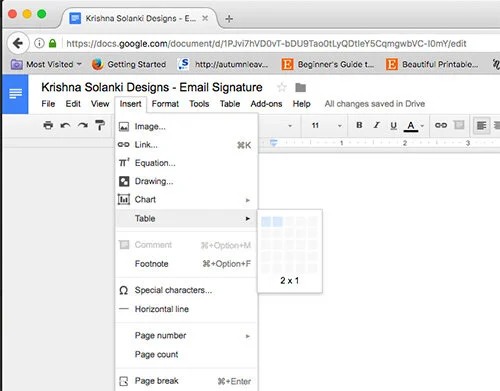
2 | Insert a table
Go to Insert - Table and choose the layout you want. I have done with 1 row and 2 columns, but this can be whatever works best for you.
3| Insert your details
You want to make sure you include all the relevant, informative details - your name, title, contact details, and any social media platforms you are on. It’s always nice to include your image, or your logo, whichever one is best suited to the nature of your business and will provide the most consistency in terms of memorability.
4 | Play around with the arrangements
You can remove borders or change the colour like I have by using the toggle in the far right corner - it’s easy to miss this so click anywhere on the table and a tiny arrow will appear in the far right corner. This is the drop down to add/remove borders.
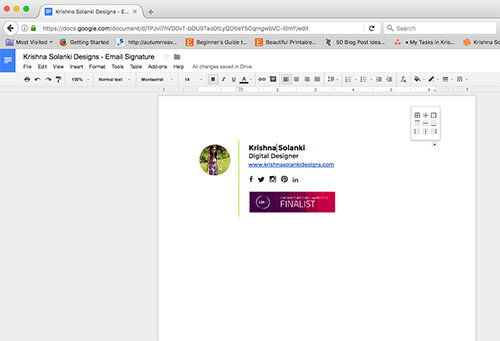
I have removed all the borders, except one, and changed the colour of this to the “lime green” I have as part of my brand colour pallette.
5 | Keep it on brand
Once you have included all the elements, make sure you remember to stay consistent and keep it on brand by using the correct fonts, and colours. If you have a brand board, don’t forget to use it!
Related:
6 | Copy and paste
Now all is left is to do it to take it over to Gmail. There are no complicated, technical things to do - It literally is COPY AND PASTE!
You can use the shortcuts - CMD A, CMD C, (on the Google Doc) and CMD P (once in the Gmail - Settings - Signature area)
That’s it! You are good to go. However, don’t forget to check how it looks by composing a new email and seeing your new branded signature!
Do you have a professionally branded email signature? What does yours look like?
